 TS-AIoT
SensingFlow
Formerly TritonSensingLogger / FlexLogger · Multi-brand gas sensor measurement & logging, now included in TS-Portal.
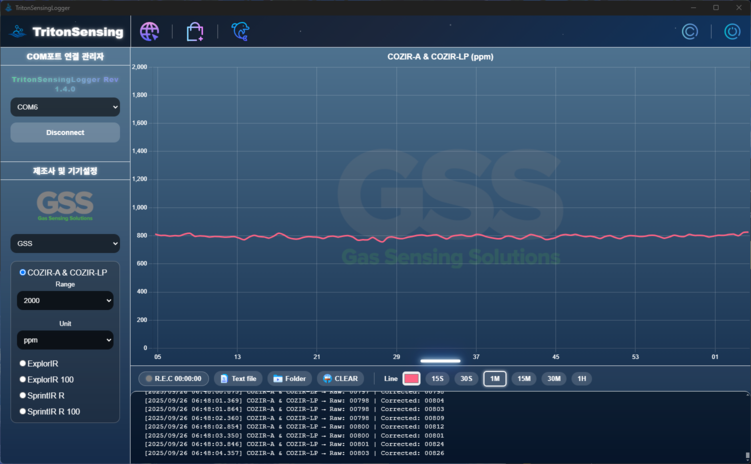
SensingFlow (formerly FlexLogger)
Overview
SensingFlow is a measurement and logging app for the gas sensors TritonSensing supplies. Connect a sensor over USB (UART), pick a brand and model, then monitor readings live, record structured logs, and calibrate the sensor — all in one place. It ships inside the TS-Portal launcher, updates together with TS-Portal, and its supported brands and sensors keep expanding.
Key Features
- Brand and model selection across EC Sense, GSS, and TritonSensing (expandable)
- Automatic COM port detection and live real-time readings
- Sensor calibration (zero / span, known-gas) directly from the app
- Structured recording into timestamped, session-based folders
- Real-time graph with adjustable time ranges
- Log export and file management
Supported Brands & Sensors
- EC Sense — TB600B / TB200B series (H2S, NH3, and more)
- GSS — CO2 sensors (COZIR / ExplorIR / SprintIR, NDIR)
- TritonSensing — AGSM series (SO2 · CO · NO2 · O3 · H2S, with temperature / humidity)
- Supported brands and sensors continue to expand
Updates & Integration
As part of TS-Portal, SensingFlow is kept up to date through the TS-Portal launcher. The standalone FlexLogger / TritonSensingLogger is no longer distributed separately. Windows only; some features (updates, cloud) require an internet connection.
SensingFlow
구 TritonSensingLogger / FlexLogger · 여러 브랜드 가스 센서 측정·로깅, 이제 TS-Portal에 포함.
SensingFlow (구 FlexLogger)
개요
SensingFlow는 TritonSensing이 공급하는 가스 센서를 위한 측정·로깅 앱입니다. 센서를 USB(UART)로 연결하고 브랜드·모델을 선택하면 실시간 판독, 구조화 로그 기록, 센서 교정을 한곳에서 처리합니다. TS-Portal 런처에 포함되어 TS-Portal과 함께 업데이트되며, 지원 브랜드·센서는 계속 확장됩니다.
주요 기능
- EC Sense·GSS·TritonSensing 브랜드/모델 선택(확장형)
- COM 포트 자동 감지와 실시간 판독
- 앱에서 바로 센서 교정(영점·스팬, Known Gas)
- 타임스탬프·세션 기반 폴더로 구조화 기록
- 시간 구간 조절이 가능한 실시간 그래프
- 로그 내보내기 및 파일 관리
지원 브랜드·센서
- EC Sense — TB600B / TB200B 계열 (H2S, NH3 등)
- GSS — CO2 센서 (COZIR / ExplorIR / SprintIR, NDIR)
- TritonSensing — AGSM 계열 (SO2 · CO · NO2 · O3 · H2S, 온·습도 포함)
- 지원 브랜드·센서는 계속 확장됩니다
업데이트 · 통합
SensingFlow는 TS-Portal의 일부로서 TS-Portal 런처를 통해 최신 상태로 유지됩니다. 단독형 FlexLogger / TritonSensingLogger는 더 이상 별도로 배포되지 않습니다. Windows 전용이며, 일부 기능(업데이트·클라우드)은 인터넷 연결이 필요합니다.
SensingFlow
旧 TritonSensingLogger / FlexLogger · 複数ブランドのガスセンサー測定・記録、TS-Portal に同梱。
SensingFlow(旧 FlexLogger)
概要
SensingFlow は TritonSensing が供給するガスセンサー向けの測定・記録アプリです。センサーを USB(UART)で接続してブランドとモデルを選ぶと、リアルタイム表示、構造化ログの記録、センサー校正を一つの場所で行えます。TS-Portal ランチャーに同梱され、TS-Portal と共に更新され、対応ブランド・センサーは継続的に拡張されます。
主な機能
- EC Sense・GSS・TritonSensing のブランド/モデル選択(拡張可能)
- COM ポートの自動検出とリアルタイム表示
- アプリから直接センサー校正(ゼロ/スパン、Known Gas)
- タイムスタンプ・セッション単位のフォルダーへ構造化記録
- 時間範囲を調整できるリアルタイムグラフ
- ログの書き出しとファイル管理
対応ブランド・センサー
- EC Sense — TB600B / TB200B 系列(H2S、NH3 など)
- GSS — CO2 センサー(COZIR / ExplorIR / SprintIR、NDIR)
- TritonSensing — AGSM 系列(SO2・CO・NO2・O3・H2S、温湿度対応)
- 対応ブランド・センサーは継続的に拡張されます
更新・統合
SensingFlow は TS-Portal の一部として、TS-Portal ランチャーを通じて最新に保たれます。単体版の FlexLogger / TritonSensingLogger は今後個別配布されません。Windows 専用で、一部機能(更新・クラウド)にはインターネット接続が必要です。
SensingFlow
Ehemals TritonSensingLogger / FlexLogger · Messung & Protokollierung von Gassensoren mehrerer Marken, jetzt in TS-Portal enthalten.
SensingFlow (ehemals FlexLogger)
Überblick
SensingFlow ist eine Mess- und Protokollierungs-App für die von TritonSensing gelieferten Gassensoren. Verbinden Sie einen Sensor per USB (UART), wählen Sie Marke und Modell und überwachen Sie Messwerte in Echtzeit, zeichnen Sie strukturierte Logs auf und kalibrieren Sie den Sensor – alles an einem Ort. Sie ist im TS-Portal-Launcher enthalten, wird mit TS-Portal aktualisiert, und die unterstützten Marken und Sensoren werden laufend erweitert.
Hauptfunktionen
- Marken- und Modellauswahl über EC Sense, GSS und TritonSensing (erweiterbar)
- Automatische COM-Port-Erkennung und Echtzeit-Messwerte
- Sensorkalibrierung (Zero / Span, Known Gas) direkt in der App
- Strukturierte Aufzeichnung in zeitgestempelte, sitzungsbasierte Ordner
- Echtzeitgraph mit einstellbaren Zeitbereichen
- Log-Export und Dateiverwaltung
Unterstützte Marken & Sensoren
- EC Sense — TB600B / TB200B-Serie (H2S, NH3 u. a.)
- GSS — CO2-Sensoren (COZIR / ExplorIR / SprintIR, NDIR)
- TritonSensing — AGSM-Serie (SO2 · CO · NO2 · O3 · H2S, mit Temperatur / Feuchte)
- Unterstützte Marken und Sensoren werden laufend erweitert
Updates & Integration
Als Teil von TS-Portal wird SensingFlow über den TS-Portal-Launcher aktuell gehalten. Das eigenständige FlexLogger / TritonSensingLogger wird nicht mehr separat verteilt. Nur für Windows; einige Funktionen (Updates, Cloud) erfordern eine Internetverbindung.
SensingFlow
Antes TritonSensingLogger / FlexLogger · Medición y registro de sensores de gas de varias marcas, ahora incluido en TS-Portal.
SensingFlow (antes FlexLogger)
Descripción general
SensingFlow es una app de medición y registro para los sensores de gas que suministra TritonSensing. Conecte un sensor por USB (UART), elija marca y modelo y monitorice las lecturas en tiempo real, grabe registros estructurados y calibre el sensor, todo en un solo lugar. Se incluye en el lanzador TS-Portal, se actualiza junto con TS-Portal y sus marcas y sensores compatibles se amplían continuamente.
Funciones clave
- Selección de marca y modelo entre EC Sense, GSS y TritonSensing (ampliable)
- Detección automática del puerto COM y lecturas en tiempo real
- Calibración del sensor (cero / span, gas conocido) desde la propia app
- Grabación estructurada en carpetas con marca de tiempo por sesión
- Gráfico en tiempo real con rangos de tiempo ajustables
- Exportación de registros y gestión de archivos
Marcas y sensores compatibles
- EC Sense — serie TB600B / TB200B (H2S, NH3, etc.)
- GSS — sensores de CO2 (COZIR / ExplorIR / SprintIR, NDIR)
- TritonSensing — serie AGSM (SO2 · CO · NO2 · O3 · H2S, con temperatura / humedad)
- Las marcas y sensores compatibles se amplían continuamente
Actualizaciones e integración
Como parte de TS-Portal, SensingFlow se mantiene actualizado mediante el lanzador TS-Portal. El FlexLogger / TritonSensingLogger independiente ya no se distribuye por separado. Solo para Windows; algunas funciones (actualizaciones, nube) requieren conexión a Internet.
SensingFlow
Anciennement TritonSensingLogger / FlexLogger · Mesure et journalisation de capteurs de gaz multi-marques, désormais inclus dans TS-Portal.
SensingFlow (anciennement FlexLogger)
Aperçu
SensingFlow est une application de mesure et de journalisation pour les capteurs de gaz fournis par TritonSensing. Connectez un capteur en USB (UART), choisissez une marque et un modèle, puis surveillez les mesures en temps réel, enregistrez des journaux structurés et étalonnez le capteur — le tout au même endroit. Elle est incluse dans le lanceur TS-Portal, mise à jour avec TS-Portal, et ses marques et capteurs pris en charge s'étendent en continu.
Fonctions clés
- Sélection de marque et de modèle parmi EC Sense, GSS et TritonSensing (extensible)
- Détection automatique du port COM et mesures en temps réel
- Étalonnage du capteur (zéro / span, gaz connu) directement depuis l'app
- Enregistrement structuré dans des dossiers horodatés par session
- Graphique en temps réel avec plages de temps réglables
- Export des journaux et gestion des fichiers
Marques et capteurs pris en charge
- EC Sense — série TB600B / TB200B (H2S, NH3, etc.)
- GSS — capteurs CO2 (COZIR / ExplorIR / SprintIR, NDIR)
- TritonSensing — série AGSM (SO2 · CO · NO2 · O3 · H2S, avec température / humidité)
- Les marques et capteurs pris en charge s'étendent en continu
Mises à jour et intégration
En tant que composant de TS-Portal, SensingFlow est maintenu à jour via le lanceur TS-Portal. Le FlexLogger / TritonSensingLogger autonome n'est plus distribué séparément. Windows uniquement ; certaines fonctions (mises à jour, cloud) nécessitent une connexion Internet.
SensingFlow
Precedentemente TritonSensingLogger / FlexLogger · Misurazione e registrazione di sensori di gas multi-marca, ora incluso in TS-Portal.
SensingFlow (già FlexLogger)
Panoramica
SensingFlow è un'app di misurazione e registrazione per i sensori di gas forniti da TritonSensing. Collega un sensore via USB (UART), scegli marca e modello, quindi monitora le letture in tempo reale, registra log strutturati e calibra il sensore — tutto in un unico posto. È inclusa nel launcher TS-Portal, si aggiorna insieme a TS-Portal e le marche e i sensori supportati si ampliano di continuo.
Funzioni principali
- Selezione di marca e modello tra EC Sense, GSS e TritonSensing (espandibile)
- Rilevamento automatico della porta COM e letture in tempo reale
- Calibrazione del sensore (zero / span, gas noto) direttamente dall'app
- Registrazione strutturata in cartelle con timestamp per sessione
- Grafico in tempo reale con intervalli di tempo regolabili
- Esportazione dei log e gestione dei file
Marche e sensori supportati
- EC Sense — serie TB600B / TB200B (H2S, NH3, ecc.)
- GSS — sensori CO2 (COZIR / ExplorIR / SprintIR, NDIR)
- TritonSensing — serie AGSM (SO2 · CO · NO2 · O3 · H2S, con temperatura / umidità)
- Le marche e i sensori supportati si ampliano di continuo
Aggiornamenti e integrazione
Come parte di TS-Portal, SensingFlow viene mantenuto aggiornato tramite il launcher TS-Portal. Il FlexLogger / TritonSensingLogger autonomo non è più distribuito separatamente. Solo Windows; alcune funzioni (aggiornamenti, cloud) richiedono una connessione a Internet.